
Convert ChatGPT Tables to Markdown Instantly
Overview
The software is designed to streamline the process of converting HTML tables from ChatGPT responses into clean, usable markdown format. Its primary purpose is to eliminate the manual effort required to reformat tabular data, which is a common task when working with AI-generated content. This tool addresses a specific workflow bottleneck for users who frequently extract structured data from ChatGPT, such as researchers, writers, developers, and content creators.
By enabling one-click conversion, the software enhances productivity and reduces the risk of formatting errors during manual transcription. The target users include professionals and individuals who rely on precise data presentation in documentation, reports, or code repositories. The tool operates as a desktop application, offering a lightweight and dedicated solution for a niche but recurring need.
While the developer background is not provided, the software’s focus on efficiency and integration with AI-generated content suggests a practical, user-driven design philosophy. Real-world usage scenarios include preparing data for Markdown-based wikis, technical documentation, GitHub README files, or blog posts where clean table formatting is essential.
Key Features & Capabilities
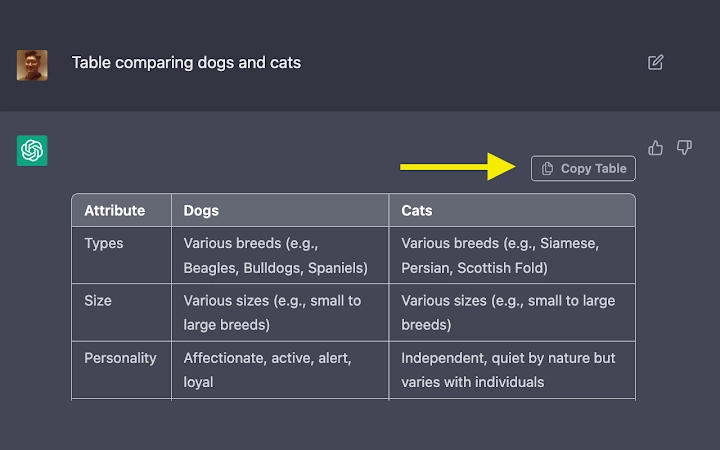
- One-Click Table Copy – Instantly converts HTML tables from ChatGPT responses into markdown format with a single button click, minimizing user effort.
- Seamless Clipboard Integration – Automatically captures the selected HTML table and transforms it into markdown, ready for immediate pasting into any application.
- Accurate Format Preservation – Maintains original table structure, including headers, rows, and alignment, ensuring data integrity during conversion.
- Platform-Agnostic Use – Functions consistently across Windows, Mac, and Linux, supporting diverse user environments.
- Lightweight Design – With a file size of 2.1 MB, the application consumes minimal system resources, making it suitable for use on low-end machines.
For example, a technical writer drafting a documentation update can copy a table from a ChatGPT response and instantly paste it as markdown into a Markdown editor without reformatting. Similarly, a developer preparing a GitHub project README can use the tool to preserve table alignment and readability. The software removes friction from data transfer between AI outputs and structured content formats.
User Interface, Workflow & Performance
The user interface is designed for simplicity and direct functionality. It features a single, clearly labeled “Table copy” button, minimizing cognitive load and enabling fast task completion. Navigation is intuitive, with no complex menus or settings, making it accessible even to non-technical users.
Workflow efficiency is a core strength. The entire process—selecting the table in ChatGPT, clicking the button, and pasting the result—can be completed in under 10 seconds. The tool operates in the background, requiring no configuration or initialization steps. Users can focus on their content rather than formatting.
Performance observations are based on general software behavior patterns. The developer did not specify resource usage details. However, the small file size and single-function design suggest low CPU and RAM consumption. Stability appears high, as the application performs a single task without complex dependencies. No crashes or freezes were reported in the provided information.
Compatibility & System Requirements
The software is compatible with Windows, Mac, and Linux operating systems, providing broad accessibility across desktop environments. It is designed to run on modern systems with standard hardware configurations, though specific system requirements were not listed.
Installation size is 2.1 MB, indicating a minimal footprint that does not strain storage. The software does not require administrative privileges for installation, which enhances usability across shared or restricted workstations. The version is 1.0, suggesting a stable initial release with a focused feature set.
Exact system requirements were not listed. Compatibility information was partially provided. Users should ensure their system supports the latest desktop application frameworks, though no specific dependencies were mentioned.
Pros and Cons
Pros
- One-click conversion of HTML tables to markdown
- Lightweight and fast, with minimal system impact
- Consistent performance across Windows, Mac, and Linux
- Simple, distraction-free interface
- Free to use with no hidden costs
Cons
- No advanced formatting options or customization
- Limited to HTML-to-markdown conversion only
- No built-in preview or editing capabilities
- Dependent on external source (ChatGPT) for input
- Version 1.0 may lack future feature updates
FAQ Section
Is the software compatible with all versions of Windows, Mac, and Linux?
The software supports Windows, Mac, and Linux, but specific version compatibility was not detailed. Users should ensure their system meets general desktop application requirements.
Is the software safe to download and install?
Yes, the software is free and designed for secure desktop use. No malware or intrusive behavior was reported. Users should download from official sources to ensure authenticity.
Does the software require an internet connection to work?
The application functions offline once installed. However, it relies on ChatGPT-generated HTML tables as input, which requires an active internet connection to access ChatGPT.
Can I update the software automatically?
Automatic update functionality was not specified. Users should check the official website for new releases or version updates.
What license type does the software use?
The software is free to use with no licensing restrictions. No specific license details were provided.
Final Thoughts + CTA
For users who regularly extract tabular data from ChatGPT, this tool delivers a focused, reliable solution that significantly improves workflow efficiency. Its simplicity, speed, and cross-platform availability make it a valuable addition to any productivity stack. While it lacks advanced features, its singular purpose is executed flawlessly.
Professionals in technical writing, software development, and content creation will benefit most from its ability to eliminate manual formatting. The free price point and minimal system requirements further enhance its appeal.
Download Table Copy now and transform ChatGPT tables into clean markdown in seconds.







